Run Your First Task
The primary way to run agent tasks is through the command line. The TUI dashboard provides a visual interface for the same operations.
Quick Start with CLI
Start an agent directly from the command line:
ah agent start --agent claude --prompt "Add a README file to this project"This launches Claude Code agent in your current directory with the specified prompt.
With a Specific Model
ah agent start --agent claude --claude-model sonnet --prompt "Refactor the main function"Non-Interactive Mode
For scripting or CI/CD, use non-interactive mode:
ah agent start --agent claude --non-interactive --prompt "Generate unit tests"The agent executes a single turn and exits.
Using the TUI Dashboard
For interactive task management, launch the TUI:
ahOr explicitly:
ah tui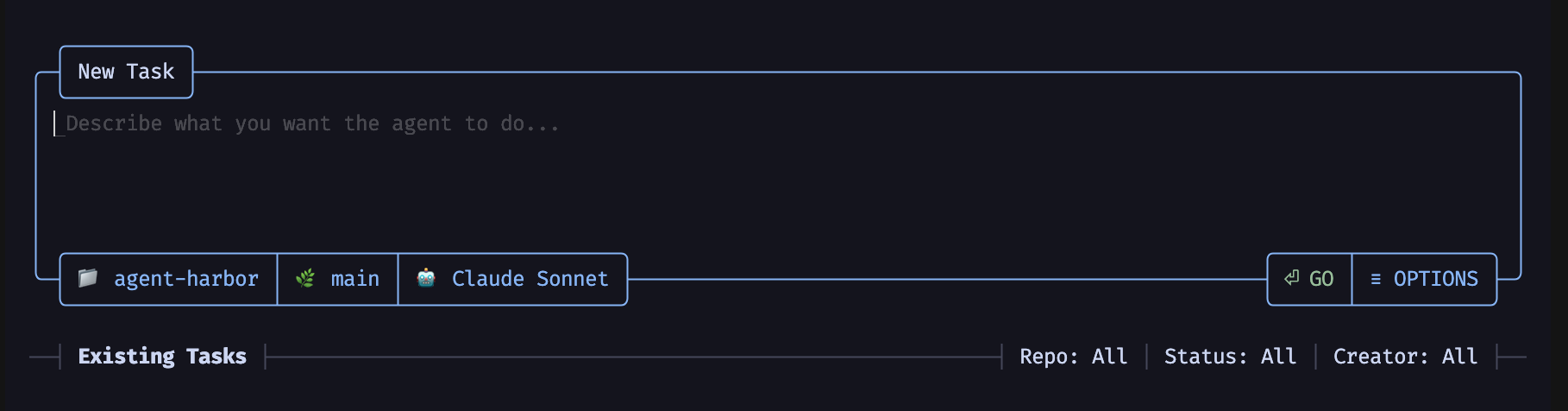
The TUI opens a dashboard where you can:
- Write a task description in the draft card
- Select an agent (Claude, Codex, etc.)
- Press
Enterto launch the task
Agent Options
| Agent | Flag | Description |
|---|---|---|
| Claude Code | --agent claude | Anthropic’s Claude Code agent |
| OpenAI Codex | --agent codex | OpenAI’s Codex CLI |
| GitHub Copilot | --agent copilot | Requires --experimental-features copilot |
| Google Gemini | --agent gemini | Requires --experimental-features gemini |
Enable Experimental Agents
ah agent start --agent gemini --experimental-features gemini --prompt "Your task"Output Formats
| Flag | Description |
|---|---|
--output-format text | Full TUI with animated output (default) |
--output-format basic-text | Simple stdout, no animations |
--output-format json | JSON output at completion |
--output-format stream-json | Streaming JSON events |
ah agent start --agent claude --output-format json --prompt "List all files"Sandbox Mode
Run agents in a sandboxed environment for extra security:
ah agent start --agent claude --sandbox --prompt "Install dependencies and run tests"| Flag | Description |
|---|---|
--sandbox | Enable sandbox mode |
--allow-network true | Allow network access |
--allow-containers true | Allow container operations |
Record the Session
Record the agent session for later replay:
ah agent record --out-file session.ahr -- ah agent start --agent claude --prompt "Fix the bug"Replay the session:
ah agent replay session.ahr